

File checks
Volare checks a file’s codec, resolution, frame rate and audio format as soon as it arrives in Delivery (see Deliverables and error checking). In addition to the initial delivery checks there are checks that can be run as desired. These checks require reading the actual contents (video and/or audio streams) of a file and as such take slightly longer to process. Due to this reason, and the fact that not all apply conceptually to every file, they are optional. Select a file on the Staging page, then select Check loudness, Check timecode or Check loop in the Inspector.
Loudness
Section titled “Loudness”Check loudness measures the whole audio track and checks it against the audio spec. This check provides the following:
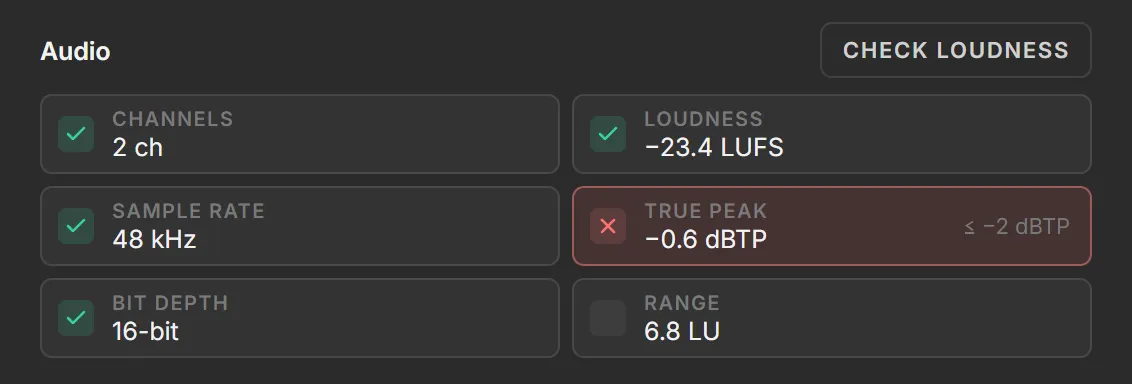
| Box | Shows | Passes when |
|---|---|---|
| Loudness | Integrated loudness: the loudness of the whole track, in LUFS | It’s within the tolerance of the loudness target. −24 ± 2 passes −26 to −22 LUFS. |
| True peak | The highest peak level, in dBTP | It’s at or below the true peak ceiling. |
| Range | Loudness range: how much the loudness varies, in LU | Never passes or fails. It’s shown for information. |
The target, tolerance and ceiling spec are defined on the Deliverables page. A failed check shows the correct value next to it. When the audio spec is set to Not checked for Loudness target or True peak ceiling , the value is still measured but and simply shown in a gray box, with no pass or fail.
Timecode
Section titled “Timecode”Check timecode looks for linear timecode (LTC) recorded on one of the file’s audio channels.

| Box | Shows |
|---|---|
| LTC start | The first complete frame of timecode, with its frame rate (rate). |
| LTC end | The last complete frame of timecode in the file, with the channel it’s on (ch). |
None found in LTC start means Volare read the file’s channels and none of them carried timecode in the first 30 seconds.
Volare can check whether a clip loops cleanly between a given out and in frame.

- Select the file on the Staging page.
- Under Loop, set the In and Out frames. Volare fills them in from the file’s In and Out tags when its name has them. With only one of the two, the other field reads first (frame 0) or last (the file’s last frame).
- Select Check loop.
What Volare compares
Section titled “What Volare compares”The loop check checks whether a jump from out to in is invisible, either because the motion carries on through it or because the loop sits on a still. A loop that starts at frame 0 has no frame before it, so Volare checks it as a Hold only.
Reading the result
Section titled “Reading the result”| Result | Means |
|---|---|
| Motion | Out matches the frame before In, so the motion carries on through the jump. |
| Hold | Out matches the first 15 frames from In, so nothing moves. |
| Mismatch | Out matches neither, so the jump is visible. |